
Discord challenges and streaks module
6
Features
3
Commands
Web
Configuration

Quick help for this module
- Challenges and streaks· Needs setup in the panel
In short
What is Discord challenges and streaks module?
The streak counts how many days in a row someone shows up on the server, and the daily challenges give three tasks refreshed every day — together they reward the consistency no points leaderboard can see.
Every counter in a typical bot measures volume: messages, minutes, points. All of them reward the same people — the ones who are already the most active. Someone who drops in for a quarter of an hour every day will never appear in a leaderboard like that, even though they are exactly who keeps the server alive midweek.
The day streak flips that measure. It does not count how much someone did, but how steadily they show up — and that cannot be made up in one long evening. Challenges are its other half: they give a concrete reason to come back today, and along the way they lead people to features nobody discovers on their own.
Problem
What problem does this module solve?
The administrator's problem
Leaderboards reward the people who are already the most active. Someone who drops in for fifteen minutes every day stands no chance against someone who spends ten hours here once a month — and nothing shows it.
How Venon Security solves it
The streak counts consecutive days, and the challenges give a daily reason to come back. Both measure consistency rather than volume.
Mechanism
How does it work, step by step?
The streak grows once a day
What counts is attendance, not message volume. One message or a few minutes in a voice channel is enough for the day to count — a hundred messages give nothing more.
The day is counted in the server's time zone, not the data centre's.
Voice counts exactly like typing
People who only sit in voice channels build the streak in exactly the same way as those who write. It is one of the few statistics where both forms of presence are equal.
A break resets the streak, but not the record
One day off takes the counter back to one. The longest streak stays on the profile permanently — it cannot be lost.
Four milestones: 7, 30, 100 and 365 days.
Three challenges a day
The set is drawn once a day and is identical for the whole server, so people can talk about it in a channel. At most one challenge from any category, so the day is not three tasks about writing.
Refreshed at midnight, server time.
Progress from activity the bot already counts
Challenges read today's statistics, game results and the thanks counter. There are no separate counters that could drift from reality.
The reward is claimed with a click
A finished challenge waits for a button. A reward granted quietly in the background is a reward nobody notices — this way people see the bar, the remaining gap and the XP arriving.
From 30 to 150 XP depending on the task.
Default values
What does the module start with?
- Streak counting
- always on, no configuration
- Announcing streak milestones
- off
- Milestone the bot starts announcing from
- 7 days
- Challenges per day
- 3
- Reward per challenge
- from 30 to 150 XP
Features
What does Discord challenges and streaks module cover?
A day streak counted from messages and from voice channels
Four streak milestones with a channel announcement
Three challenges a day, the same for the whole server
XP rewards claimed with a click
A leaderboard of the longest active streaks
The streak visible on the profile card
Configuration
How do you turn Discord challenges and streaks module on?
There is nothing to switch on
Streaks and challenges work the moment the bot joins. The streak starts counting from day one — earlier activity is not reconstructed.
No configuration
Turn on milestone announcements if you want them
The bot can congratulate someone in a channel when they hit a milestone. It stays quiet by default, because a message from a bot is seen by the whole server and should be a deliberate decision.
Panel → Community → Engagement → Streaks
Match the milestone to the size of your server
On a large server half the members reach a week and the channel turns into a counter. Thirty days is already a result worth mentioning.
The “From which milestone to announce” field
Bot permissions
Which permissions the bot needs
Nothing beyond the basics — the module only reads and sends messages.
Result
What will the administrator see?
- Streak announcement settings: the switch, the channel and the minimum milestone
- A leaderboard of the longest active streaks through the leaderboard command
The counter itself has no settings — it always runs. The panel only controls whether the bot talks about the milestones.
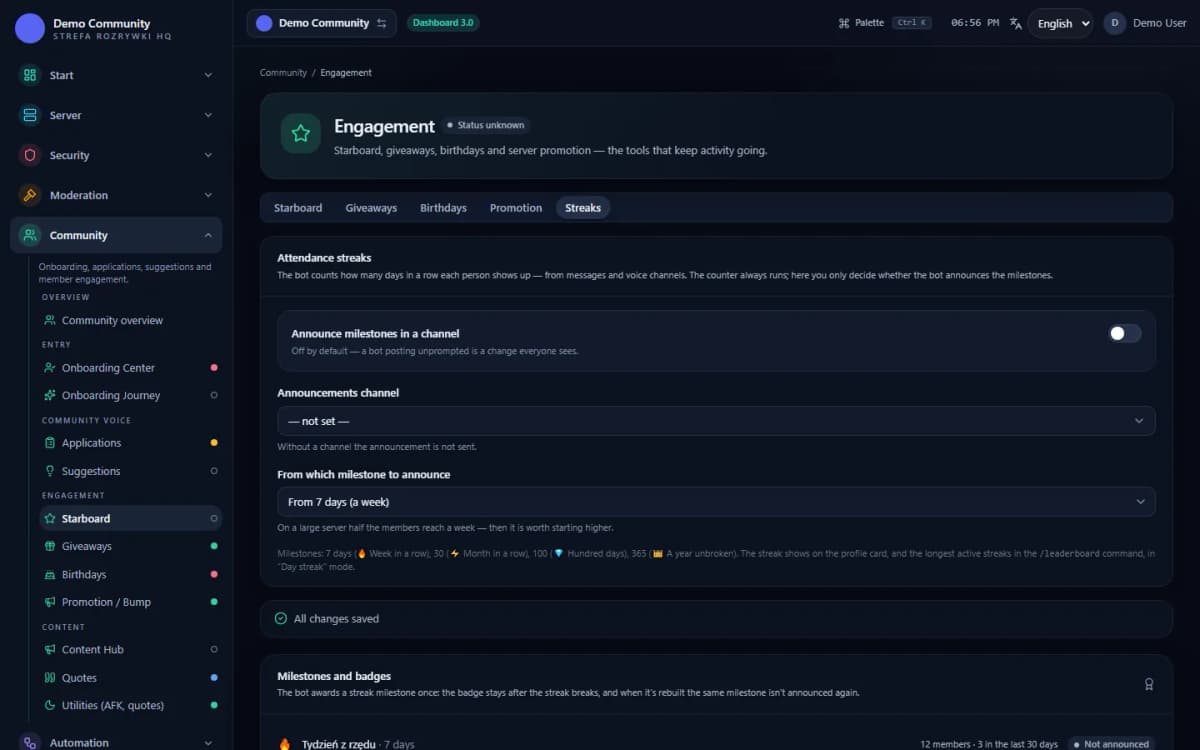 Sample data
Examples
Examples of use on a Discord server
An announcement after thirty consecutive days of attendance
A “spend an hour in voice” challenge with an XP reward
A ranking of the people keeping the rhythm this week
Limits
What does Discord challenges and streaks module not do?
History is not reconstructed
The streak starts counting from the moment of rollout. Daily statistics have a retention period, so there is no reliable way to establish who attended how many days in a row in the past.
The streak is separate for each server
Attendance on one server does not keep a streak alive on another — it measures engagement with one specific community.
FAQ
FAQ – common questions
Does sitting in a voice channel count towards the streak?+
Yes. A minute in a voice channel counts the day exactly like a sent message. People who only talk in voice build a streak on equal terms with those who write.
What happens if I miss a day?+
The current streak goes back to one, but the record stays on the profile permanently. It cannot be lost or lowered.
Does everyone get the same challenges?+
Yes. The set is drawn once a day for the whole server, so people can discuss it in a channel and compare progress.
Can a challenge reward be claimed twice?+
No. The claim is stored in the database under a key covering the server, the person, the day and the task, so even two simultaneous clicks grant the XP only once.
Do I have to enable anything in the panel?+
No. Streaks and challenges work straight away. The panel only sets whether the bot announces the streak milestones reached and which milestone it starts from.
Set up Discord challenges and streaks module in Venon Security
Add the bot to your server, open the panel and configure the module together with its commands, logs and team permissions.