
AutoMod Discord – automatic content moderation
10
Message detectors
6
Action levels
per rule
Its own penalty and duration
0s
Changes without a restart

Quick help for this module
- AutoMod· Works right after adding the bot
Where to configure
- Security → Content protection
Commands
Common problems
Related features
In short
What does AutoMod Discord do?
AutoMod is a message filter that reads every post before a moderator gets to it, and reacts by the rules you set yourself — from deleting the content to muting its author.
On a living community nobody reads everything. Spam, floods, shouting in caps or an invite to another server appear in a second, and classic moderation is always one step behind. AutoMod Discord reverses that order: the rule fires the moment a message is sent, and a human only steps into the cases that need judgement.
In Venon Security, AutoMod is not one “turn moderation on” switch. It is ten independent detectors, each with its own threshold, its own action and its own penalty duration. You can start with three and add more once you see what actually happens on your channels.
Detectors
Ten detectors checking every message
Anti-spam
Counts one person's messages in a time window. Crossing the threshold is a violation — regardless of what the content was.
Anti-caps
Measures the share of capital letters in a message against a percentage threshold. Short messages are skipped, so abbreviations are not punished.
Banned words
Your own list of words and phrases, matched case-insensitively. A regular-expression blacklist works separately, for advanced use.
Mention limit
Counts member and role mentions in a single message and reacts once the threshold is crossed.
@everyone and @here
A separate detector for mass mentions — the most common way to wake the whole server with one post.
Invite blocking
Catches links inviting people to other Discord servers — including the short variants of discord.gg, discord.io and discord.me.
Raid echo
Detects the same content sent by many different accounts at once. That is the signature of a coordinated attack, not of a single spammer.
Glyph shield
Reacts to messages masked with unusual characters and alphabets, the trick used to slip past an ordinary banned-word list.
New-member burst
Treats messages from accounts that have just joined separately. A fresh account writing across several channels at once is a different risk profile from a regular.
Cross-channel flood
The same person posting the same content across several channels at once is caught as one violation, not as several independent ones.
Mechanism
What happens to a message that breaks a rule
The message goes to ten detectors at once
AutoMod does not stop at the first hit — it checks every rule and collects the full set of violations for one message.
Detectors: spam, caps, banned words, invites, mentions, @everyone/@here, raid echo, glyph shield, new-member burst, cross-channel flood.
Exempt accounts are skipped before the check
The server owner, accounts with the Administrator permission and roles on the exemption list never reach the filters at all. Bots are always skipped.
The list of exempt roles is shared between AutoMod and LinkShield.
The bot picks the strictest planned action
Every detector has its own action. When one message breaks several rules, the heaviest one wins — they do not add up into several separate penalties.
The ladder: OFF → no action → delete → warn → mute → kick → ban.
The mute duration depends on the rule
A mute for spam is shorter than one for a banned word. Every detector has its own duration, which you set separately.
By default: 10 minutes for most rules, 60 minutes for banned words.
The message disappears, the author gets a direct message
Deleting the content and notifying the author are separate switches. You can keep deletion alone if direct messages are unwelcome on your server.
The “Response to a violation” card: delete the message, send a DM, log to the moderation log channel.
The event lands in the moderation logs
The reason, the rule and the action taken go to the log channel, so afterwards you can reconstruct why something disappeared.
Requires a channel assigned to the “Moderation” log category.
The specifics
The thresholds AutoMod starts with
- Spam threshold
- 5 messages
- Spam window
- 5 seconds
- Caps lock threshold
- 70% capital letters
- Minimum message length for caps
- 10 characters
- Maximum number of mentions
- 5
- Mute duration (most rules)
- 10 minutes
- Mute duration for banned words
- 60 minutes
- Deleting the message and a DM to the author
- on
- Banned-word list
- empty — you fill it in
Configuration
How to set AutoMod up on Discord
Open the Content protection screen
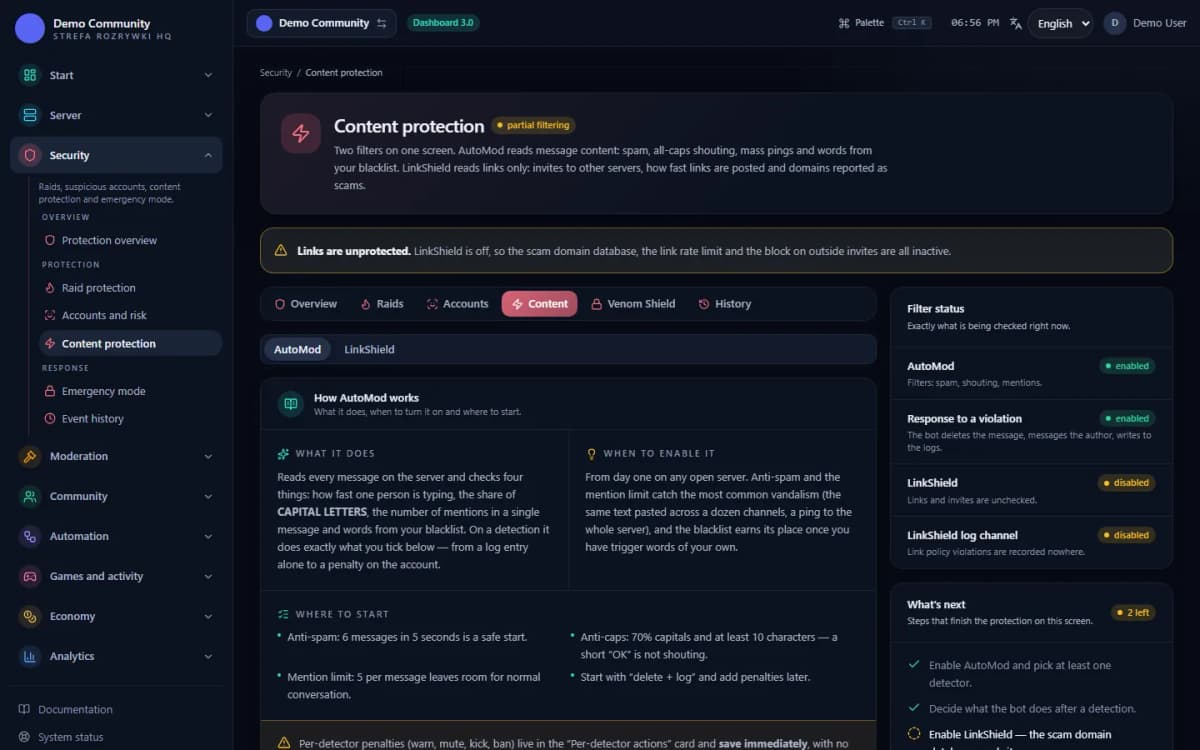
AutoMod and LinkShield share one screen in the Security centre, across two tabs. Start with the AutoMod tab.
Panel → Security → Content protection (
/security/content)Turn the “AutoMod active” switch on
While it is off, no detector runs, even if the thresholds are set. The VenonSec core has to be on as well.
The “Detectors” card → the first switch
Enable the detectors you actually need
Do not turn everything on at once. Anti-spam, the mention limit and invite blocking are usually enough to begin with — add the rest once you see what really happens on the server.
Switches: Anti-spam, Anti-caps, Mention limit, Block links
Fill in the word blacklist
One word or phrase per line. The list starts empty, because what counts as a violation depends on what the server is about. The regex blacklist is separate and meant for advanced use.
The “Word blacklist” and “Regex blacklist” cards
Set the action for each detector separately
This is the most important step. A sensible start: delete the message for caps and spam, warn for mentions, mute for banned words. Leave banning to the moderators.
The “Actions per detector” card
Add exempt roles and a log channel
Without them the bot will punish moderators for cleaning up after spam, and you will not see what it removed. The exempt-role list is shared with LinkShield.
Exemption settings in the Security centre + Panel → Moderation → Logs (the “Moderation” category)
Bot permissions
Which permissions the bot needs
- Manage Messagesonly for this feature
Deletes a message that breaks a rule (when deletion is on).
- Manage Rolesonly for this feature
The “mute” action gives the mute role.
- Kick Membersonly for this feature
Only when you set the “kick” action.
- Ban Membersonly for this feature
Only when you set the “ban” action.
Result
What the administrator sees when AutoMod fires
- The message breaking the rule disappears from the channel, if “Delete the message” is on.
- The author gets a direct message with the reason — provided they accept DMs from server members.
- An entry in the moderation log channel: who, which rule, what reason, what action.
- A warning in the member's history when the detector's action is “warn” — visible through /warn and in the moderation panel.
- A mute with the duration set for the rule that was broken, when the action is “mute”.
If messages disappear but no entries show up in the logs, check the “Moderation” category in the log settings — with no channel assigned, the event has nowhere to go.
 Sample data
Limits
What AutoMod does not do
It does not know your context
AutoMod checks patterns, not meaning. A quote containing a banned word, a joke between friends and a genuine insult all look the same to a filter. That is why a warning is a better action than a ban on strict rules.
It does not scan images, files or voice
The filters work on the text of a message. An image with offensive writing, a file with a link inside or a conversation in a voice channel will not pass through the detectors.
It does not check arbitrary links
The “Block links” detector in AutoMod covers invites to other Discord servers. Phishing, scams and domains outside a trusted list are handled by the separate LinkShield module.
It does not penalise administrators
The server owner, accounts with the Administrator permission and roles exempt from penalties are skipped before the rules are checked. That is deliberate — the bot must not lock the person who runs it out of their own server.
It will not tune itself
The default thresholds are a starting point, not the result of analysing your community. A gaming server and a tech server need different values, and nobody but you can set them.
It will not replace moderators
AutoMod takes the repetitive work off the team: spam, floods, shouting. Conflicts, appeals and cases that need a conversation stay with people — the bot only documents them.
The most common misunderstanding is about links. The detector in AutoMod blocks invites to other Discord servers. Recognising phishing, scams and domains outside a trusted list is the job of the LinkShield module, which keeps its own threat database fed by community reports.
When violations stop looking accidental and arrive in a wave, the Discord AntiRaid bot looks at the same phenomenon from the other side: not at the content, but at the rate. You configure all of it in the Discord bot dashboard.
FAQ
FAQ – common questions
What does AutoMod Discord do in Venon Security?+
AutoMod Discord checks every message with ten detectors at once — spam, caps lock, banned words, mentions, @everyone/@here, invites, raid echo, glyph shield, new-member bursts and cross-channel flood. Once it finds a violation it deletes the message, warns, mutes or escalates further, depending on what you set.
How does AutoMod differ from AntiRaid?+
AutoMod judges the content of individual messages; AntiRaid judges the rate of events across the whole server. AutoMod catches a spammer, AntiRaid catches a wave of a hundred accounts joining at once. They work independently and are best kept both on.
Can I set my own list of banned words?+
Yes, and you have to — the list starts empty, because what counts as a violation depends on what the server is about. You enter one word or phrase per line. A separate regular-expression blacklist is available; a broken pattern is ignored by the bot rather than breaking the module.
What does AutoMod do after finding a violation?+
Every detector has its own action from the ladder: no action, delete the message, warn, mute, kick, ban. When one message breaks several rules, the bot performs only the strictest of them — penalties do not stack.
Will AutoMod penalise a moderator or an administrator?+
No. The server owner, accounts with the Administrator permission and roles on the exemption list are skipped before the message reaches the detectors at all. The same list applies to LinkShield.
Does AutoMod check images and attachments?+
No. The detectors work on the text of a message. An image with writing on it, a file or a voice conversation are out of their reach — that is a job for moderators and for reports from the community.
Instructions
Step-by-step guides
See also
Related pages
Turn AutoMod on and give the team its time back
Add Venon Security, enable three detectors to start with and tune the thresholds from the panel while watching what actually happens on the channels.