
Discord AntiRaid bot – protecting your server from raids
24/7
Detection in the background
4
Independent counters
plan
Isolation and lockdown after approval
live
Thresholds change without a restart

Quick help for this module
- AntiRaidMonitor only· Works right after adding the bot
- RaidWatchMonitor only· Off by default — you turn it on in the panel
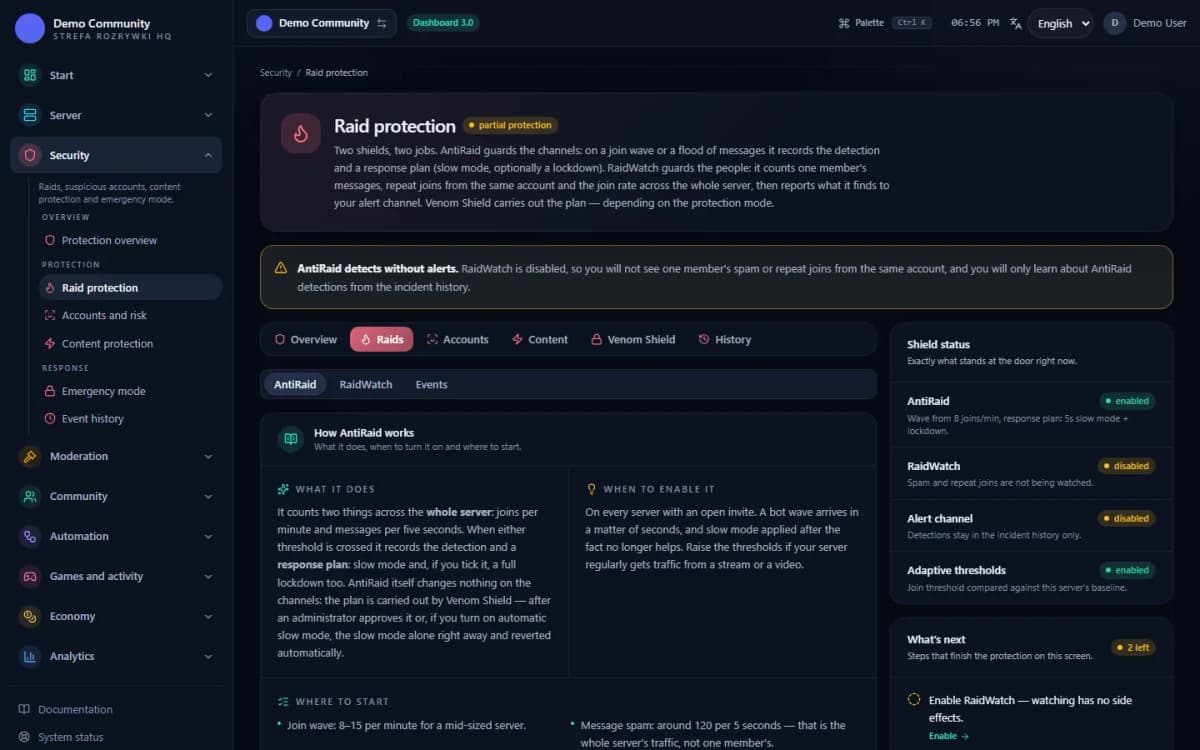
AntiRaid and RaidWatch run in monitor-only mode: they detect and alert the team, but take no action on their own. A moderator approves a lockdown or penalties.
In short
What is AntiRaid on Discord?
AntiRaid is a counter with an alarm: it watches how many people enter the server and how many messages appear at the same moment, and on an unnatural spike it warns the staff and prepares a response plan. Traffic on the server is limited only by Venom Shield — after an administrator approves it.
A raid on Discord is rarely the work of one spammer. It is an organised wave of accounts that join the server within seconds, flood the channels, send scam links or provoke chaos. Manual moderation is late here by definition: by the time somebody notices the notifications, the damage is done.
The Discord AntiRaid bot takes the first line — not because it is smarter than a moderator, but because it counts without pausing. Venon Security deliberately separates two things: detection, which always runs, and the response, which is a separate decision by the administrator. That way a false alarm costs one message in the staff channel rather than a series of bans.
Mechanism
How raid detection works, step by step
It measures the join rate
The bot counts entries in a one-minute window. Crossing the threshold signals a join wave — the most common opening of a raid.
Default threshold: 8 joins per minute. The “Join wave (joins/min)” field in the panel.
It measures the message rate across the server
A second counter watches channel traffic in a five-second window. A sudden spike means a flood, even when each single message looks innocent.
Default threshold: 120 messages per 5 seconds. The “Message spam (msg/5s)” field.
It catches the same person coming back
RaidWatch separately tracks accounts that join and leave over and over — typical when someone is testing your defences before the real attack.
By default: 3 joins within a 10-second window.
It compares against your server's norm
Adaptive thresholds set the current traffic against the server's usual rhythm. The bot takes the stricter of the two verdicts, so adaptation can never weaken the protection.
Adaptive thresholds are on by default.
It records the signal and raises the alarm
A detection lands in the event log and in the RaidWatch alert channel, together with what was observed, which threshold was crossed and which actions were proposed.
A mass @here ping on a critical alert is a separate, deliberate consent — off by default.
It prepares a plan, it does not punish on its own
The responses you tick (mute, kick, ban, slowmode, lockdown) go into the alert as a plan — information for the team. Venom Shield carries out only account isolation (an isolation role) and a server lockdown or slowmode: in approval mode after an administrator decides, and in limited automation it isolates only recognised bots by itself and — if you turn it on — slows the channels for the planned time and reverts it on its own. Mutes, kicks and bans are carried out by a moderator. The automation never runs a full lockdown.
The RaidWatch tab → the “Planned responses to an attack” card; protection mode: Security → Emergency mode.
Responses
Response layers: from an alert to a lockdown
Alert (always)
The lowest layer: the bot writes in the alert channel what it detected, with what confidence and which threshold was crossed. It changes nothing on the server.
Mute on spam (in the plan by default)
The plan item ticked by default. For an account flooding the channels the alert proposes a mute, not a ban — a moderator mutes it (/mute or the sanctions panel).
Kick on a raid (optional)
A separate plan item. You tick it when you want the alert to propose removing accounts taking part in a detected wave (with the option to come back) — a moderator kicks them.
Ban and lockdown (optional, manual-first)
Banning on a raid and a full server lockdown stay out of the plan until you tick them. Bans are carried out by a moderator; a full lockdown is carried out by Venom Shield, always after an administrator approves, and it starts in observation mode and changes nothing on its own.
Event log
Every detection and every action gets an entry: who, when, which threshold, which response. The “Events” tab shows the last 7 days.
Thresholds without a restart
You change the values and switches in the web panel. The bot reads the configuration as it goes — there is nothing to restart.
The specifics
The default values you start with
- Join wave (joins/min)
- 8
- Message spam (msg / 5 s)
- 120
- Slowmode in the response plan
- 5 s for 300 s
- RaidWatch: messages / min
- 10
- RaidWatch: joins / 5 min
- 5
- RaidWatch: fast re-entries
- 3 within 10 s
- Mute on spam (plan)
- ticked
- Kick / ban / lockdown on a raid (plan)
- not ticked
- Venom Shield mode
- observation — carries out nothing on its own
- @here ping on a critical alert
- off
Configuration
How to turn AntiRaid on for your server
Add the bot and open the security centre
Once Venon has joined, sign in to the panel with your Discord account and pick the server. Raid protection has its own screen in the Security centre.
Panel → Security → Raid protection (
/security/raids)Turn the VenonSec core on
AntiRaid only runs while the protection core is on. The Protection overview screen shows how many of the real switches are active and which systems are asleep.
Panel → Security → Protection overview, or the
/venonsec_panelcommand on the serverSet the thresholds in the AntiRaid tab
Start from the defaults and tune them to your server's rhythm. A small server catches a wave at a lower threshold; a large community needs a higher one so ordinary traffic is not caught.
Fields: Join wave (joins/min), Message spam (msg/5s), Slowmode (seconds)
Point to an alert channel in the RaidWatch tab
Without an alert channel a detection is written to the log, but nobody learns about it in time. Pick a channel visible only to the staff.
The RaidWatch tab → “RaidWatch active” + “Alert channel”
Decide on the plan and the protection mode
Tick only the responses you take responsibility for (a sensible order: mute → kick → lockdown → ban; a ban cannot be undone), then turn Venom Shield on in approval mode — after your decision it carries out account isolation and the lockdown, while mutes, kicks and bans from the plan are done by a moderator.
The RaidWatch tab → the “Planned responses to an attack” card, then Security → Emergency mode
Check the bot's role hierarchy
Venon's role has to sit above the accounts it is meant to act on and hold the permissions to mute, kick and ban. Without that the action fails even though the detection was correct.
Discord server settings → Roles → move the bot's role above the member roles
Bot permissions
Which permissions the bot needs
- Kick Membersonly for this feature
When a moderator kicks accounts from a detected wave through the bot (/kick).
- Ban Membersonly for this feature
When a moderator bans through the bot (/ban).
- Manage Channelsonly for this feature
A full lockdown, once an administrator approves it, changes channel permissions.
- Manage Rolesonly for this feature
The same lockdown — Discord requires it to change channel permission overwrites.
Result
What the administrator sees when AntiRaid fires
- A message in the RaidWatch alert channel with the signal's name, the observed value and the threshold that was crossed.
- An entry in the “Events” tab on the Raid protection screen — the list of what the bot actually caught in the last 7 days.
- An entry in the moderation logs, if the “Moderation” category has a log channel assigned.
- The response plan inside the alert — the bot states plainly what it proposes and that it carried out nothing without approval.
- A Venom Shield session to approve (approval mode) — slowmode, account isolation and lockdown happen only after an administrator decides, and they can be undone.
If a test spike in traffic leaves none of those traces, check in this order: the VenonSec core is on, RaidWatch is active, an alert channel is set, and the bot's role sits above the member roles.
 Sample data
Limits
What AntiRaid does not do
It does not punish on its own
AntiRaid and RaidWatch do not mute, kick, ban or close channels by themselves — they record the detection and the plan. After approval Venom Shield can isolate accounts and lock the server down; mutes, kicks and bans are carried out by a moderator. Without that the bot warns and records the event — nothing more.
It does not read message content
AntiRaid looks at rate and volume, not at what is written. Profanity, mass mentions and suspicious links are AutoMod's and LinkShield's job.
It does not work above Discord's hierarchy
The bot will not mute, kick or ban an account whose role sits above its own. Server administrators and the owner are out of reach of automatic penalties — that is a limitation of Discord itself.
It does not restore what is already gone
AntiRaid limits the damage during an attack, but it does not bring back deleted channels or messages. Venon's backup restores roles and module settings, not the channel structure.
It does not protect against an attack from a staff account
A compromised administrator account bypasses the filters, because it holds permissions above the bot's. What helps there is narrowing permissions, two-factor login on Discord and backups — not AntiRaid.
It does not guess intent
A giveaway, a raid from a live stream or a sudden influx from TikTok look exactly like an attack to a counter. That is why the default response is an alert, not a penalty — the decision stays with a human.
It is worth reading that as a division of labour, not as a gap. AntiRaid watches the rate, AutoMod Discord watches the content, member verification watches the entrance, and LinkShield watches the links. Every layer catches what the previous one lets through — and none of them pretends to do everything.
You set the thresholds, the switches and the alert channel in the Discord bot dashboard, and you will find the full detection history in the moderation logs.
FAQ
FAQ – common questions
What is AntiRaid on Discord?+
AntiRaid protects a Discord server against a coordinated attack — a wave of accounts joining at once, a flood of messages or mass spam. The Discord AntiRaid bot measures the rate of these events and reacts before a moderator has noticed anything is happening.
How does Venon Security detect a raid?+
Venon runs several counters at once: joins per minute (threshold 8 by default), messages across the server in a 5-second window (120 by default), repeated re-entries by the same person (3 within 10 seconds) and the share of deleted messages. On top of that it compares the current traffic with your server's own norm and takes the stricter of the two verdicts.
Will AntiRaid ban ordinary members?+
No. AntiRaid and RaidWatch only detect and record a response plan (a mute on spam by default; kicking, banning and lockdown you tick yourself). After an administrator decides, Venom Shield can isolate accounts and lock the server down; mutes, kicks and bans are carried out by a moderator. Administrators, the server owner and roles exempt from penalties are skipped.
What is a lockdown and when does it start?+
A lockdown is an emergency closure of the channels and of the way into the server. In Venon it is always an administrator's decision: you start it by hand from the Emergency mode screen, or you approve a lockdown proposed in the response plan. Venom Shield never closes the channels on its own, in any mode.
How will I know AntiRaid did something?+
You get a message in the RaidWatch alert channel describing the signal, the observed value and the threshold. The same event appears in the “Events” tab on the Raid protection screen, and in the moderation logs if you have a log channel set.
Do AntiRaid settings require restarting the bot?+
No. You save the thresholds, the alert channel and the response switches in the web panel, and the bot reads the configuration as it goes. The change applies from the next check, with no gap in protection.
Instructions
Step-by-step guides
See also
Related pages
Turn AntiRaid on before somebody tests your defences
Add Venon Security to your Discord server, set the thresholds and the alert channel, and then decide for yourself how much the bot may do without you.