

Your Discord.Guarded by Venon.
Venon is a Discord bot that brings raid protection, moderation, automation, community tools and an economy together. You set it all up in one web panel, in English or Polish.
- Free, no premium tier
- No Administrator permission
- Bot and panel in English and Polish
- 69 modules — enable only what you need

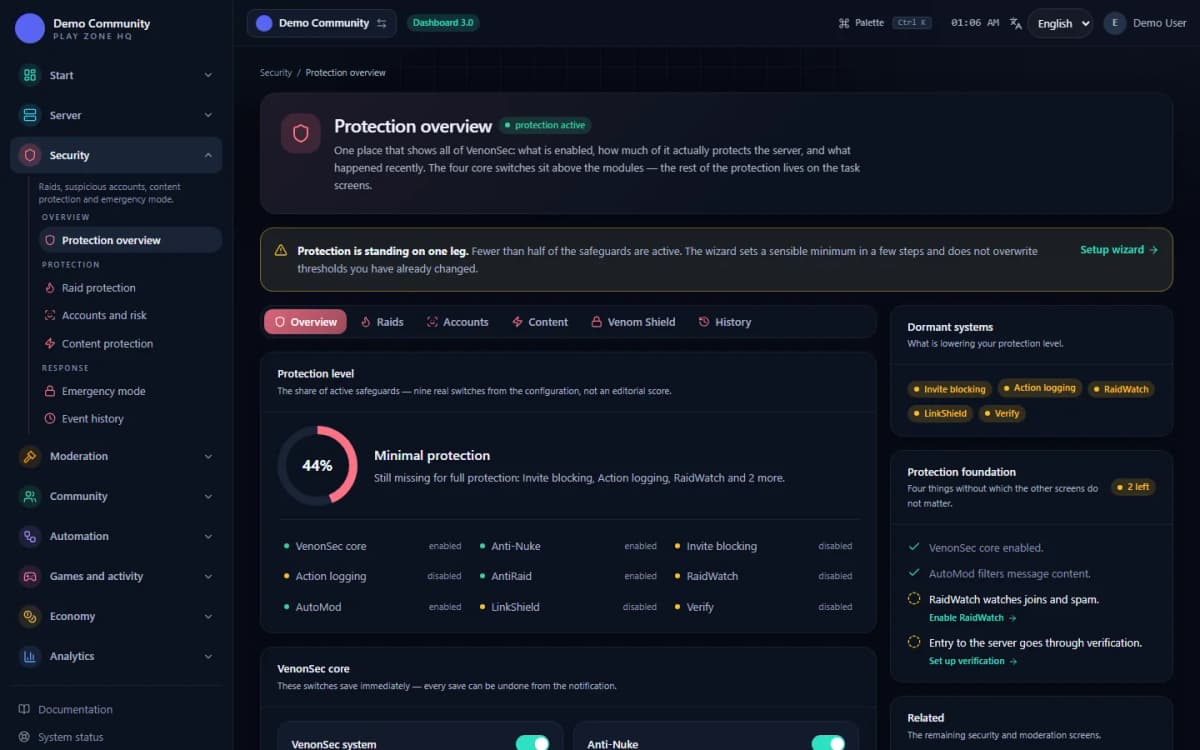
The panel in your browser
Six screens you will see after you log in

Modules
Eight areas of running a server, in one bot
- Security8Raid and fake-account detection, content filters, protection against phishing and mass destruction of the server.
- Moderation7Sanctions with history, mutes, reports, tickets and a full record of what the team did.
- Automation7No-code rules, schedules, automatically assigned roles and channels created on demand.
- Community13Verification, welcomes, applications, suggestions, giveaways and everything that builds a community.
- Games and activity10XP levels, reputation and games that give members a reason to come back.
- Economy12Server currency, jobs, companies, a shop and games — a virtual economy enabled with a wizard.
- Analytics6Server activity in numbers: trends, daily rhythm, reports and counters.
- Server and permissions6Backups, team access to the panel, command permissions and bot settings.
Venon in action
What happens on the server, step by step
A wave of joins (raid)
Simulated walkthroughTrigger
Dozens of new accounts join the server within a minute.
Detection
AntiRaid crosses the join threshold and raises an alert in the staff channel.
Action
Venom Shield proposes locking the channels, and an administrator approves it in one click.
Result
Channels are locked and permissions saved — after the attack you undo the lockdown with one button.
AntiRaid works in monitor mode: it detects and alerts but doesn't lock anything by itself. Venom Shield has to be turned on.
See the moduleFor your server
A different server, a different set of modules
Gaming server
Lots of new people, voice channels and the risk of raids.
Community
Welcomes, self-assigned roles, activity and members' ideas.
Creator server
New content announcements, giveaways and roles for viewers.
Support and shop
Tickets, reports and tidy team permissions.
Getting started
From adding the bot to working protection
- 1
Add Venon
In Discord's window you pick the server you're adding the bot to.
- 2
Approve the permissions
The bot asks for the permissions its modules need — without Administrator.
Permission list and reasons - 3
Sign in to the panel
You sign in with your Discord account, and the panel shows the servers you manage.
- 4
Run the setup wizard
The wizard walks you through the basics: verification, logs and raid protection.
Trust
Numbers from the running bot, not from a brochure
Servers with Venon
The data is briefly unavailable — the bot may be running normally.
Members on those servers
The data is briefly unavailable — the bot may be running normally.
Modules
In 8 categories — from protection to the economy.
Slash commands
Top-level commands, not counting subcommands.
FAQ
Common questions before adding the bot
I added the bot, but the slash commands do not appear.+
Most often the bot was added without the applications.commands scope. Add it again with the invite link (scope: bot + applications.commands). Global commands can take up to about an hour to update.
The bot is online, but does not react to commands.+
Check the bot permissions in the channel (View Channel, Send Messages, Use Application Commands). Moderation commands additionally need permissions such as Kick / Ban Members and Manage Messages.
Verify, or granting roles, is not working.+
The bot's role has to sit ABOVE the roles it grants in the hierarchy, and the bot needs the Manage Roles permission. Make sure as well that the Verify module is enabled and configured (channel + role) in the dashboard.
AntiRaid alerts too often, or AutoMod reacts too strongly.+
You adjust the thresholds and actions in the dashboard (the AntiRaid / AutoMod sections). Changes apply immediately, with no restart. That is also where you set the allowlist of channels and roles exempt from the filters.
Logs, tickets or panels are not creating channels.+
The bot needs the Manage Channels and View Channel permissions in the target category. The fastest route is the auto-setup button in the module — it creates the structure and sets the permissions itself.
I cannot sign in to the panel through Discord.+
Sign in at panel.venon-sec.xyz with an account that has the Administrator or Manage Server permission on the server (or access granted in the panel), and make sure the browser isn't blocking cookies. The sign-in screen explains what went wrong — if that doesn't help, write on the support server.
How much does Venon cost?+
Nothing. Venon Security is free — every protection, moderation and community module and the whole web panel, with no per-server limits and no premium tier. There is no feature unlocked by a payment and no limit that disappears once you pay.
How do I report a bug or get help?+
Join the Venon support server — that is where you report a bug, ask a question and get help with rolling out or configuring the modules.
Add Venon and start with the basics
Verification, AutoMod and logs in a few minutes — turn on the other modules when you need them.