
Discord leveling bot
6
Features
3
Commands
Web
Configuration

Quick help for this module
- XP levels· Off by default — you turn it on in the panel
Where to configure
- Games and activity → XP levels
Commands
Common problems
Related features
In short
What is Discord leveling bot?
XP levels turn activity in conversations and voice channels into points, and points into roles — with safeguards that do not reward typing “lol” every two seconds.
A level system is often treated as decoration. In practice it is the simplest way to see who actually keeps the conversation alive — and to give those people something more than the default @everyone role.
Venon counts XP both for messages and for time spent in voice channels, and additionally splits activity into paths. That shows not only how active someone is, but what in — and someone doing several things at once gets a bonus for it.
Problem
What problem does this module solve?
The administrator's problem
Without measuring activity it is hard to see who really builds the community, and easy to miss the moment when conversation dies down.
How Venon Security solves it
Levels count activity in text and voice conversations, reward it with roles and show what a person is active in — not just how much they write.
Mechanism
How does it work, step by step?
Points for messages and for voice
Every message and every minute in a voice channel gives XP. Both sources have their own multipliers, so you can value voice conversations above text, or the other way round.
Both multipliers default to 1.0.
Protection against farming
The bot does not count messages sent back to back, nor overly short ones. That is what separates a real conversation from padding the counter.
By default: a 60-second gap between scored messages, minimum 5 characters.
Channel and role exclusions
Spam channels, bots and roles that should not collect points are excluded from scoring. Without that, the leaderboard quickly stops meaning anything.
Separate lists for channels and for roles.
Roles for reaching a milestone
You can assign roles to any level. There are two behaviours to choose from: roles from lower milestones stay, or they are replaced by the newer one.
Default mode: roles from lower milestones stay.
Activity paths and resonance
Activity is split into paths, and someone active in several at once gets a multiplier. It rewards range rather than one repeated behaviour.
Default resonance window: 7 days.
The level-up announcement
The bot announces a new level in the same channel, in a chosen channel, in a direct message, or not at all. It can also give a heads-up when someone is close to levelling.
The pre-level-up notice is off by default, threshold 90%.
Default values
What does the module start with?
- XP multiplier for messages
- 1.0
- XP multiplier per voice minute
- 1.0
- Farming protection
- on
- Gap between scored messages
- 60 seconds
- Minimum length of a scored message
- 5 characters
- Milestone role behaviour
- roles from lower milestones stay
- Activity paths and resonance
- on, 7-day window
- XP bonus for server boosters
- on, ×2
Features
What does Discord leveling bot cover?
XP for messages and for time in voice channels
Protection against farming points
Roles granted for reaching a milestone
Channels and roles excluded from earning XP
Activity paths instead of one counter
A leaderboard and a profile card
Configuration
How do you turn Discord leveling bot on?
Turn XP levels on
The module is off by default. Once on, points start accruing immediately — history from before is not reconstructed.
Panel → Games and activity → XP levels
Set the multipliers to suit your server
On a voice-first server it is worth raising the voice multiplier. On a text server, the opposite. There is no single right value here.
The “Message XP multiplier” and “Voice XP multiplier” fields
Exclude channels that should not give points
Meme, bot and command channels usually distort the leaderboard. Five minutes of work that decide whether anyone will bother looking at the results.
The list of channels excluded from earning XP
Add milestone roles
Start with three milestones, not twenty. The reward should be noticeable, not inflationary.
The “Level rewards” card → milestone and roles
Choose how level-ups are announced
Announcing in the same channel is the most natural, but on a busy server it clutters the conversation. A separate channel or a direct message is better then.
The “Where to announce” and “Announcement channel” fields
Bot permissions
Which permissions the bot needs
- Manage Rolesonly for this feature
When you set roles for levels.
- Attach Filesonly for this feature
The level and level-up card as an image.
Result
What will the administrator see?
- A level-up message in the place you chose — the conversation channel, an announcements channel or a direct message.
- The reward role appearing next to the member's name once the milestone is reached.
- A server leaderboard available by command and in the panel, split into text and voice activity.
- A member profile card with the level, the progress and the activity paths.
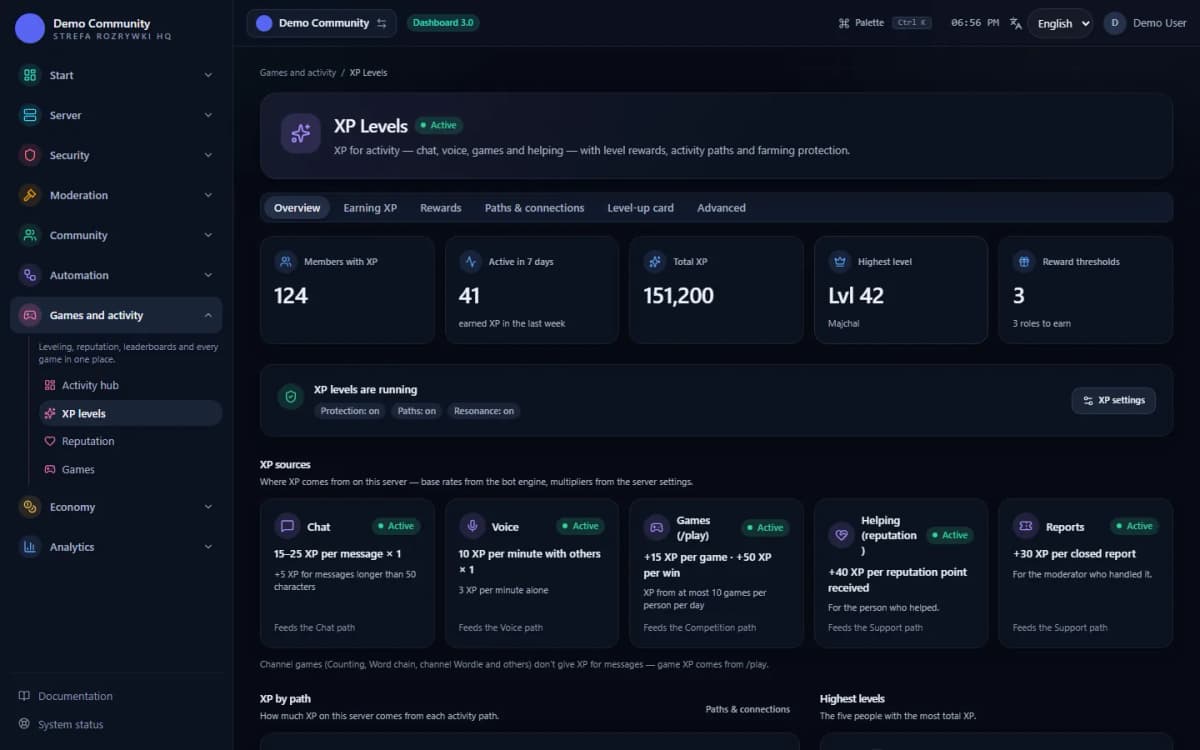 Sample data
Examples
Examples of use on a Discord server
A role for people above level ten
A meme channel excluded from earning XP
A ranking of the most active people over the last month
Limits
What does Discord leveling bot not do?
It does not count history from before it was enabled
Points accrue from the moment the module is turned on. Activity from previous months cannot be reconstructed — Discord does not expose that data.
It does not judge the quality of what people write
The bot counts messages that meet the minimum conditions, not their value. Farming protection limits the worst abuse, but it will not replace moderation.
It will not grant a role above its own
Reward roles have to sit below the bot's role in the hierarchy. Otherwise the milestone is reached but the role never appears.
It will not make anyone active
Levels reward what is already happening. On a dead server the leaderboard will only show that it is dead — it will not bring anyone in by itself.
FAQ
FAQ – common questions
What do members earn XP for?+
For messages and for time spent in voice channels. Both sources have their own multipliers, so you can value voice conversations above text. Minigames — Counting and Word chain — can grant XP as well.
Does leveling encourage spam?+
Not if you leave farming protection on. By default the bot scores one message per 60 seconds and skips messages shorter than 5 characters. It is also worth excluding spam channels from scoring.
Can I grant roles for levels?+
Yes. You assign roles to each milestone and the bot grants them once it is reached. There are two behaviours: roles from lower milestones stay, or they are replaced by the newer one.
What are activity paths?+
A split of activity into kinds, instead of one shared counter. Someone active on several paths at once gets an extra multiplier — it rewards range rather than repeating one action.
Will levels be calculated retroactively once I enable the module?+
No. Points count from the moment it is turned on. History from before the install does not exist and cannot be reconstructed.
Set up Discord leveling bot in Venon Security
Add the bot to your server, open the panel and configure the module together with its commands, logs and team permissions.