
LinkShield Discord – protection against scams and phishing
3
Reports to auto-block
4
Threat categories
per server
Its own database
/zglos-link
The reporting command

Quick help for this module
- LinkShield· Off by default — you turn it on in the panel
Where to configure
- Security → Content protection
Commands
Common problems
Related features
In short
What is LinkShield and when do you need it?
LinkShield is an address filter: it removes messages carrying domains your server has judged dangerous, and makes sure nobody floods the channels with links.
Phishing on Discord always follows the same pattern: a credible-looking link to free Nitro, a giveaway or a login page. One person clicking and entering their details is enough for the attack to spread further — because from the compromised account it reaches all of their friends.
LinkShield breaks that chain at the message stage. The key difference from an ordinary blacklist is that the threat database belongs to your server and grows from your people's reports. A community sees more than one moderator does, and the module turns those observations into a rule that runs around the clock.
Features
Six mechanisms running in parallel
Blocking confirmed threats
A domain from the threat database means the message is deleted immediately. The match covers subdomains too, so hiding behind a prefix does not help.
A database that learns from reports
A domain reported by enough different people moves from the pending list to the confirmed one, and from that moment it is blocked automatically.
Reports from the community
The /zglos-link command lets anyone report a suspicious address and pick a category: scam, phishing, malware or other. A repeated report from the same person does not count twice.
Discord invite filter
Links inviting people to other servers are removed and the violations counted. Past the limit the bot can issue a ban — if you let it.
Link rate limit
A separate counter watches how many addresses from outside the trusted list one person sends in a short window. Crossing it ends in a temporary block on posting links.
Trusted domains and exemptions
The trusted-domain list starts with the popular services and is fully editable. Separately, you can exempt specific people and roles from every check.
Mechanism
What happens to a message containing a link
The bot finds the addresses in the message
What is checked is the text of the message, not how it looks. An address hidden inside the content will be found regardless of formatting.
Bots, the server owner, administrators and roles exempt from penalties are skipped.
It compares them with this server's threat database
Domains confirmed as dangerous are checked first. A hit ends the check — the message disappears and that domain's hit counter goes up.
The database is kept separately for each server. Your reports stay with you.
It checks invites to other servers
Discord invites have their own violation counter per member. Past the limit the bot can issue a ban and open a case in the moderation register.
Default limit: 5 violations. The ban past the limit is on by default.
It counts addresses from outside the trusted list
Links to services on the trusted list are skipped. The rest go into the time-window counter — several addresses in a few seconds looks like mass posting, not conversation.
By default: more than 3 addresses within a 10-second window.
It applies a temporary link block
Past the limit, further messages containing addresses are deleted for the time you set. This response is reversible — once it passes, everything goes back to normal.
By default: 5 minutes.
It records the event in the log channel
Every detection goes to the channel you chose: the type of violation, the address and the author. Without that channel the blocks happen silently.
The LinkShield log channel is set separately from the moderation logs.
The specifics
LinkShield's default thresholds
- Domain auto-block threshold
- 3 different reports
- Invite violation limit
- 5
- Ban past the invite limit
- on
- Maximum links in the window
- 3
- Link counting window
- 10 seconds
- Block duration past the limit
- 5 minutes
- Reports from members
- on
- Trusted domains to start with
- youtube, twitter/x, twitch, github, imgur, reddit
Configuration
How to block dangerous links on Discord
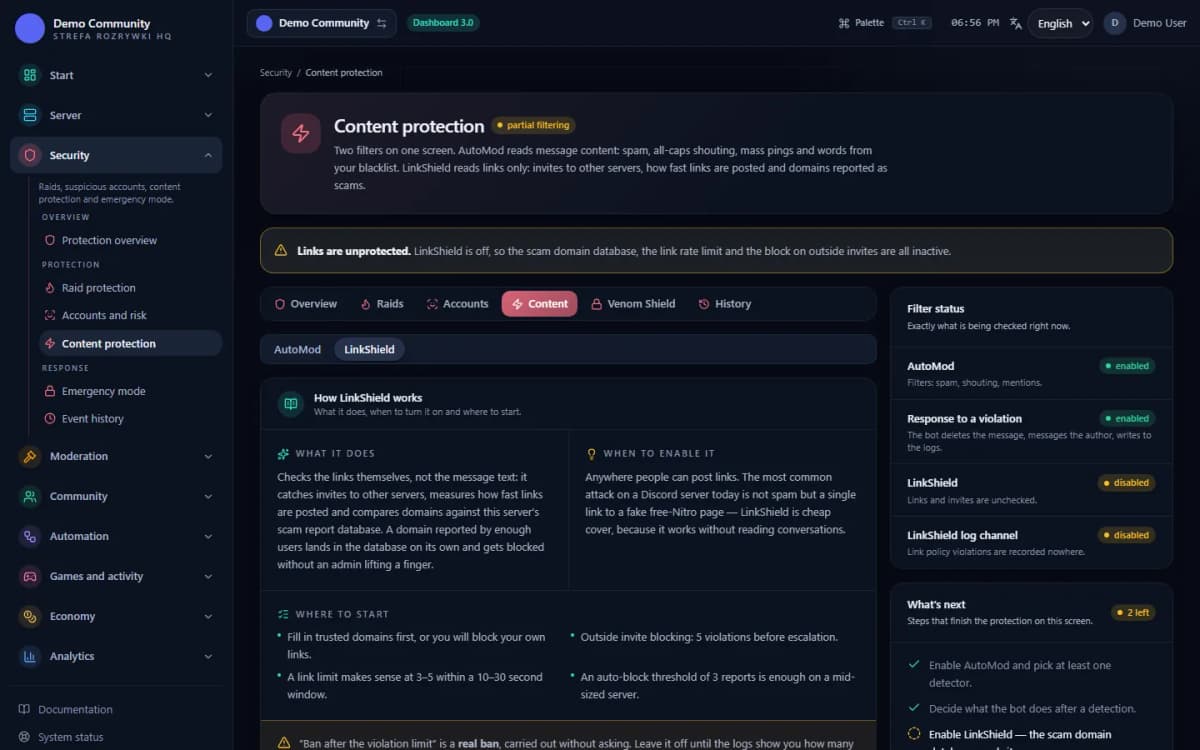
Open the Content protection screen and go to the LinkShield tab
LinkShield shares the screen with AutoMod, because both filter messages — but they have separate switches and separate thresholds.
Panel → Security → Content protection → the LinkShield tab (
/security/content)Turn the “LinkShield active” switch on
The module is off by default. The VenonSec core has to be on as well — without it LinkShield checks nothing.
The “Links and invites” card
Decide on your invite policy
Decide whether you block invites to other servers and after how many violations a ban should follow. On servers with partnerships it is worth switching the ban off and keeping only the removal.
Fields: Block Discord invites, Max. invite violations, Ban past the limit
Tune the link limit
The default 3 addresses per 10 seconds is reasonable for ordinary conversation. On a channel where people share material, raise the threshold or add the domains used there to the trusted list.
Fields: Max. links in the window, Window (seconds), Timeout (minutes)
Point to a log channel and set the auto-block threshold
The log channel is the only place where you see what the bot removed. The auto-block threshold says how many different people have to report a domain before it starts being blocked without asking.
The “Log channel and reports” card
Fill in the trusted domains and mention /zglos-link
Add the domains your community uses day to day, so you are not fighting your own filter. Then tell people about the reporting command — without reports the database does not learn.
The “Trusted domains” and “Threat database” cards + the
/zglos-linkcommand on the server
Bot permissions
Which permissions the bot needs
- Manage Messagesalways
Deletes messages with dangerous links.
- Ban Membersonly for this feature
A ban for invites after the violation limit — only if you turn it on.
Result
What the administrator sees when LinkShield fires
- The message with the dangerous address disappears, and the author gets a short note in the channel about the reason.
- An entry in the LinkShield log channel: the type of violation (threat, invite, link spam), the address and the author.
- A rising report counter next to a domain in the “Threat database” card — you can see which addresses are approaching the threshold.
- A case in the moderation register, when an invite violation ended in a ban.
- The domain's status in the database: pending, confirmed or rejected — with the option to change it by hand.
If links disappear but the log channel stays quiet, check the “Log channel” field in the LinkShield tab — it is set separately from the moderation logs.
 Sample data
Limits
What LinkShield does not do
It does not open or scan pages
LinkShield compares domains against lists; it does not analyse the content of a page or follow where a redirect leads. A link shortener pointing at a scam will not be recognised until the shortener itself lands in the database.
It does not know threats nobody reported
The database is kept separately for each server and learns from your reports. A fresh phishing campaign gets through until enough people report it or you add the domain by hand.
It does not read images or attachments
An address in a screenshot, inside a PDF or spoken in a voice channel is out of the filter's reach. It works on text content only.
It does not protect against a link from an administrator
The server owner, accounts with the Administrator permission and the people and roles exempt from penalties are not checked. A compromised staff account bypasses the filter.
It does not remove messages from before it was enabled
The module works on incoming messages. Addresses sent earlier stay on the channels until somebody removes them by hand.
It will not recover an account someone has already lost
LinkShield limits how far a scam reaches, but it does not undo its effects. For someone who entered their details on a fake page, only changing the password and reporting to Discord helps.
The most important limit is this: the bot does not open pages. It compares domains against lists and measures the rate, so a fresh phishing campaign gets through until somebody reports it. That is why the /zglos-link command is part of the module rather than an extra — it is what turns the community's attention into protection.
The invite filter in LinkShield and the invite detector in AutoMod cover a similar phenomenon from different sides — the first counts violations and escalates to a ban, the second treats an invite like any other content violation. When a scam comes together with a wave of accounts, it is worth having AntiRaid on as well.
FAQ
FAQ – common questions
How does LinkShield protect against scams and phishing?+
It compares the domains in a message against the list of addresses your server considers dangerous. A hit means the message is deleted immediately and an entry appears in the log channel. The match covers subdomains, so adding a prefix in front of the domain name does not get past the filter.
How does the threat database learn?+
Members report suspicious addresses with /zglos-link. The bot counts how many different people reported a given domain — a repeated report from the same person does not count twice. Once the threshold is passed (three different reports by default) the domain becomes confirmed and is blocked automatically.
Is the threat database shared between servers?+
No. Every server has its own: reports from your community stay with you, and you decide what counts as confirmed. You can also add a domain by hand, without waiting for reports.
How do I report a suspicious link?+
With the /zglos-link command — you give the address or just the domain, and optionally a category: scam, phishing, malware or other. The report goes into the server's threat database, where the moderation team can see its status and the number of reports.
Can I add my own trusted domains?+
Yes. The list starts with the popular services (YouTube, X, Twitch, GitHub, Imgur, Reddit) and is fully editable. Addresses from that list do not count towards the link limit in the time window.
Does LinkShield block invites to other servers?+
Yes, if you enable the invite filter. The bot removes the link and counts the violations — once the limit is passed (five by default) it can issue a ban and open a case in the moderation register. The ban itself can be switched off, leaving only the removal.
Instructions
Step-by-step guides
See also
Related pages
Stop the scam before anyone gets to click
Add Venon Security, turn LinkShield on, set the log channel and show your community the /zglos-link command.